
Running Student Data Reports
Learn how to access, view, and organize data and reporting tools in your advising practice.
Overview and Data Security
Overview
The UW has multiple interconnected systems to manage and query student data. Understanding the structure of these systems and how to run reports can improve the efficiency and effectiveness of academic advising. This section will introduce student data resources at the UW and how to access and use the reports most useful for academic advising. Next steps will be introduced for advisers who wish to customize queries for more specific questions.
Running data reports is a great way for advisors to track student progress, look at students individually or as a group, and capture and store crucial information about a student population at a given time of the quarter. Academic/student services professionals typically only have access to the reports relevant to their specific job title.
Data Security
Student records are protected under the Family Educational Rights and Privacy Act (FERPA), which allows students rights to review education records, not release directory information, and provide consent for the release of personally identifiable information. The Office of the University Registrar provides additional information and resources regarding FERPA.
When running and manipulating reports, it is important to remember that you are accessing sensitive student information and if you are storing the reports or using the information to share data with your program or department you are aware of what information is included and what doesn’t need to be shared with other parties. For example, if your department is giving awards to graduating students with high GPAs, I may pull a “Student Grade Report by Major” to capture the cumulative GPA of all students in a specific major code. The full report may include several columns with additional student data beyond GPA. To protect student privacy, the additional content should be removed from the report to only include critical information.
In order to protect the identities of students when presenting aggregated reports, cell sizes <10 should be redacted. This protects students by limiting the opportunities for someone to individually identify them within these reports. For example, if you produce a report on final grades for a course based on race/ethnicity, while the report may not contain student names someone may be able to discern specifically who a student is based on the fact they are among the less than 10 students of a particular race/ethnicity in said course. In this case, for any bucket with fewer than 10 students in it, replace the number with “<10”.
For more information about security and privacy roles, responsibilities, and definitions, refer to the Administrative Policy Statement. IT Connect offers more detail about student data security in the EDW as well as requesting a data access role.
Academic Data Systems Map
Academic Data can be accessed using many different systems. Below is a map of where you can access academic data and where the information is being pulled from. Definitions of those systems are also included below.
UW Student Database (SDB): “The UW Student Data Base (SDB), also known as Keynes, is a university-wide system for managing student records and student data.” Advisers can directly interface with SDB for individual records and data entry, but you must use a terminal emulator and access screens with a system of codes.
Electronic Academic Records Systems (EARS): An interface for individual student academic records on SDB through a web browser. With the exception of adviser notes, all data from EARS is stored and accessed from the SDB. More information about EARS.
MyPlan: System for undergraduate students to search degree programs and courses, build academic plans, and audit degree progress. More information about MyPlan.
MyGrad: Student database for Graduate Program Advisors (GPAs) to review admissions, current student records, and data reports.
Enterprise Data Warehouse (EDW): The University’s Enterprise Data Warehouse (EDW) integrates data from many sources across the University into a central repository For student academic data, EDW organizes and archives historical data across time. Think of this as storing a limited ‘snapshot’ of student data that SDB collected. These data allow advisers to view changes in student groups and academic programs over time.
Business Intelligence Portal (BI Portal): The Business Intelligence Portal is your gateway to the UW's Enterprise Data Warehouse reporting and analysis tools. The BI Portal is a home page to view data from EDW. Reports or visualizations can be viewed directly with a web browser or they can be exported for additional analysis. These reports were initially released to advisers through an ‘EDW Reports’ website. The BI Portal replaces that site and includes additional features (to bookmark ‘favorite’ reports/visualizations). The BI Portal requires a NetID and the person accessing it must be on campus. The BI Portal includes:
-
Reports: Lists of Individual Records *Must be logged into UW NetID to access.
-
Visualizations: Graphs of trends over time.
-
Cubes: Connect to a cube with Excel or Tableau and build your report. No need to filter and export a dataset again! There is currently an admissions cube and others are being prototyped. More about cubes.
UW Profiles: Uses data from the Enterprise Data Warehouse (EDW) to allow members of the UW campus community to explore and aggregate trend data at the level of the University, campus, school or college, or department. The academic set of UW Profiles focuses on academic data, providing dashboards with information about major enrollments, student credit hours (SCH), degrees awarded, and student progress. In addition, we have added a set of peer dashboards with information about budgets, revenue, and expenditures. Log on with your UW NetID to gain access to and learn about UW Profiles.
Requesting Access
BI Portal/UW Profiles
Most academic advisers should request access under the “Advisor/Academic Staff” role. This will allow you to run reports, visualizations and UW profiles related to academic student data. This requires approval by your ‘unit authorizer,’ who is typically your immediate supervisor.
MyGrad
For Graduate Advisors, the “Advisor/Academic Staff” role in MyGrad will give you access to data reports. To request access, review MyGrad Authorization Video Tutorials.
Common BI Portal Reports and Exporting Data
Common Reports
*Note: NetID log in and access is required in order to view reports. Utilize the search tool on BI Portal to generate the reports below.
Here is a list of reports that advisers commonly use:
- Class List by Curriculum Course Section: Current roster of registered or no longer registered students for each course by curriculum, course and section. Useful for reviewing satisfactory progress, managing curriculum, determining course overload issues. This report does not include grade information.
- Current Student Registration Courses: Displays current registration information for all students in a selected major. Useful for tracking majors and satisfactory progress.
- Current Student Transcript Courses: Lists all of the courses students have registered in within a specific major.
- Degree Codes: Displays information about degree codes for selected departments. Useful for finding a code when filling out a change of major form or filing a graduation application, or for looking up a degree's tuition category
- Student Grade Report by Major or Student Grade Report by Curriculum Course and Section: Displays a student's individual grades from courses taken, as well as the quarterly GPA. It also includes cumulative GPA and departmental GPA calculated at the time the report is run
- Undergraduates Eligible to Register: This report provides a list of undergraduate students that are considered eligible to register for courses in a given quarter.
- Course Section Fill Rates: This report allows the user to see how full each course section is. For a selected Year, Quarter, Campus, Department, Curriculum, and Section Type, the user can see what the total capacity is (Total Seats), how many seats are taken, and percentage full.
- Trends in Student Majors: Tracks the expansion and contraction of student major registrations over time, at all levels (Bachelor’s, Master’s, etc.) in all academic units.
- Current Student Information:This report displays a population of students that have a registration record for the selected quarter and the selected Major(s)/Minor(s). The report also displays student demographic information, contact information, majors, and GPAs for students enrolled in the current quarter. (Major and Minor are consolidated into this report)
- Satisfactory Progress Policy List: Matriculated students are expected to make satisfactory progress toward the attainment of a baccalaureate degree, which means they are expected to enter a major and graduate after completion of a reasonable number of credits.
- Time Schedule Information (Example Included Below): This report displays UW Time Schedule information for selected parameters and includes access to historical, current, and future (1 year ahead) data.
- Student Degree Information: This report displays a list of students who have applied for and/or were granted a degree for one or more years or quarters.
Defining Terms
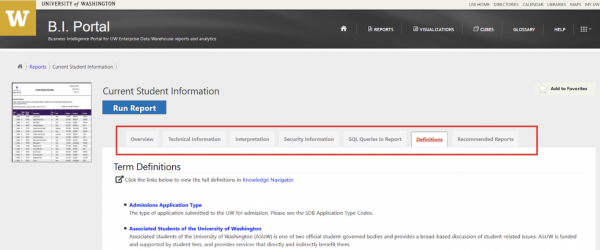
For a glossary of terms used in EDW reports, visit the Student Data Terms glossary. In addition, there are tabs on each BI-Portal report that include interpretation or documentation guides.
How do I use BI-Portal to find answers to common advising Questions?
Below are examples of which reports an adviser might use to answer some frequently asked questions. In each section we have included the name of the report and a sample exercise to help advisers learn how to run the report and ensure they are doing so correctly.
1. When is a particular class typically offered?
Report you would use for this: Time_Schedule_Information
Exercise to try using sample dataset: A student comes to your office who wants to know when ASL 305 is offered. The Course Catalog/MyPlan don't include this information for this course. Run a report that would tell you when this course has typically been offered. (Note: For answer, see the last section of this page)
Helpful notes/tips: Courses may appear in this report even if they were only initially scheduled for the listed quarter and were ultimately removed from the Time Schedule; for the most reliable data, it’s best to cross-reference the results of this report with the Time Schedule. When relying on this report, it’s also good to remind students that when a course was offered historically does not always provide a foolproof method of determining when it will be offered in the future.
2. What code should I use for this major/minor when filling out the Change of Major (CoM) form?
Report you would use for this: Major_Codes, Minor_Codes, Degree_Codes
Exercise to try using sample dataset: A student meets with you who would like to declare the N SCI minor. You are filling out the Change of Major form but don't know the College this minor is housed in to enter the minor code for this minor. Run a report that would tell you the complete code for this minor.
Helpful notes/tips: If unsure of the College, you can run the report for all Colleges and Departments and then search for the relevant minor or major within the complete list.
3. How can I generate a list of all the students in a particular class?
Report you would use for this: Class_List_By_Curriculum_Course_Section
Exercise to try using sample dataset: The Geography Department has scheduled 4 sections of GEOG 180 in AUT 2018, but section AA is under-enrolled with only 1 student compared to the other sections that have 9-10 students each. Your department plans to cancel the under-enrolled section and you’d like to email the one student who is enrolled to suggest that they change to another section. Generate a class list and find the email address for the one enrolled student.
Helpful notes/tips: Remember that this list only updates every 24 hours, so students who registered the day that you run the report won’t show up in the list. In cases like the example scenario, it can be helpful to add code the section for one day (so that no new students add the course) and then run the report the next day to make sure you capture all registered students.
4. How can I generate a list of the students who are currently in my major/minor?
Report you would use for this: Current_Student_Information_By_Major, Current_Student_Information_By_Minor
Exercise to try using sample dataset: You maintain a listserv for students in the Architecture major where you send out announcements to students about upcoming opportunities and events. You’d like to also subscribe students in the Architecture minor to this list. Generate a list of all currently registered students who have declared the ARCH minor. How many students will you need to add to your listserv?
Helpful notes/tips: Students must be currently registered to be included in the output of this report. If trying to generate a list of majors during Summer quarter (when many students are not registered) or attempting to anticipate how many students will be in the major next quarter, Undergraduates_Eligible_To_Register may provide a better estimate.
5. How can I generate a list of the students who will be in my major in an upcoming quarter?
Report you would use for this: Undergraduates_Eligible_To_Register
Exercise to try using sample dataset: Your department, Earth & Space Sciences, offers a capstone course (ESS 400/401) in Summer quarter that is typically only taken seniors in the ESS Environmental BS (0-ESS-30-15), ESS Biology BS (0-ESS-10-15), and ESS Geology BS (0-ESS-50-15). You’d like to estimate the number of students who will enroll in the capstone course this summer. Run a report to generate a list of these students for SUM 2019. How many students appear in this list?
Helpful notes/tips: Be sure to select “Class” in the “Columns to Display” dropdown menu to include class in the output. After generating the output, use the arrow at the top of the “Class” column to sort the result by class, then total the number of seniors (either by hand or by using the COUNTIF function in Excel).
As demonstrated in the example scenario, this report can also be used to generate a list of some subset of your majors.
6. How can I generate a list of all the courses that have been taken by all the students in my major?
Report you would use for this: Current_Student_Transcript_Courses
Exercise to try using sample dataset: Your department, Biology, is considering a curriculum change to allow STAT 390 as a substitute for the current STAT 311 requirement. Before moving forward with this change, you would like to see how many of your undergraduates have already taken STAT 390 at UW. Generate a list of all the UW courses taken by your students to see how many current BIOL students have already taken STAT 390.
Helpful notes/tips: Remember to use the “Class” dropdown menu to exclude pending, graduate, and professional students. After generating the output, sort by course and then total the number of STAT 390 rows (either by hand or by using the COUNTIF function in Excel).
7. How can I generate a list of the transfer students in my department with information about the schools they are transferring from?
Report you would use for this: Current_Student_Transfer_Summary
Exercise to try using sample dataset: You are an adviser for the Linguistics Department and you are planning to do outreach to Washington community colleges. You’d like to start by contacting 2-year schools that have been the source of the largest number of students who transfer to your program to major in Linguistics (C LING 00). Run a report to identify the WA school that is the source of the largest number of transfer students in your major.
8. How can I examine the number of students in my program over time?
Report you would use for this: How Many Students List
Exercise to try using sample dataset: For an upcoming faculty meeting, your department, Human Centered Design and Engineering (HCDE), has asked you to provide data on the total number students in the program over time. Run a report to pull these numbers for Autumn 2010, 2014, and 2018.
Helpful notes/tips: Students must be registered by Census Day in the given quarter to be included in the count, so if running this report for Summer, bear in mind that the numbers will likely underrepresent the size of the major. Undergraduates_Eligible_To_Enroll is usually better for getting a sense of the size of the major if you would like to include students who are taking a quarter off.
9. How can I get a list of the students in my department who will receive a Satisfactory Progress-related warning or hold in a given quarter?
Report you would use for this: Satisfactory_Progress_Policy_Report
Exercise to try using sample dataset: Your department, Marine Biology, engages in outreach to students who are expected to receive a registration hold for unsatisfactory progress to encourage students to come in and take care of that hold in advance of registration. How many students are projected to receive a satisfactory progress-related hold or warning in Winter 2025?
Helpful notes/tips: This list will include students who may have been on track to receive a "Warning" or hold due to not having yet declared a major. However, their Change of Major form was set to be processed for the following quarter so they may be excluded from this count.
10. How can I generate a list of student grades by course?
Report you would use for this: Student_Grade_Report_By_Course
Exercise to try using sample dataset: Your department, Earth & Space Sciences, is interested in examining whether the average grades in ESS 311 have changed as a result of a change in instructors for the course. Generate grade data for ESS 311 for WIN 2015 and WIN 2016 and calculate the average grade for those two quarters. Then generate grade data for WIN 2017 and WIN 2018 and generate grade data for those two quarters. What are the averages for each pair of quarters?
Helpful notes/tips: Be sure to exclude the lab sections from the output using the “Section” dropdown menu to avoid outputting duplicate information each student’s lecture and section. You can select the floppy disk icon and download the data an an Excel file (.xlsx) to calculate the average in Excel. You will need to make sure that Excel is treating the cells are numbers rather than text before calculating the average.
Note that the answer provided here does not fully answer the initial question that was being posed. This is a small dataset being used for illustrative purposes only. To truly examine whether there had been a shift in grading for this course as the instructors changed, you would want more data points for each instructor and you would need to conduct more sophisticated analysis to determine whether the differences between the averages were statistically different from each other.
11. How can I generate a list of my students’ grades in a given quarter?
Report you would use for this: Student_Grade_Report_By_Major
Exercise to try using sample dataset: Informatics Advising typically engages in quarterly outreach to undergraduate students who have received a Hardship Withdrawal (HW), now called Former Quarter Drop, or less than a 1.9 grade in one or more of their courses in the previous quarter. Run a Winter 2024 transcript report for INFO undergraduates who were registered in Spring 2024. How many undergraduates would the INFO Advising staff have needed to email and invite in to meet with an adviser?
Helpful notes/tips: Remember to use the “Class” dropdown menu to exclude pending majors, graduate students, and professional students. Note also that this report generates a row for each grade rather than each student, so the number of students to contact should be less than the number of rows in the resulting spreadsheet.
12. How can I generate a list of all the students who graduated from my program in a given year?
Report you would use for this: Student_Degree_Information
Exercise to try using sample dataset: You are planning the upcoming departmental graduation event for American Ethnic Studies and want to estimate the maximum number of undergraduates who might participate based on the number of undergraduates who graduated last year. Run a report to determine how many AES students graduated between AUT 2023-SUM 2024.
Helpful notes/tips: Students who major OR minor in the department are eligible to participate in a departmental ceremony. Remember to select “Bachelor” from the “Degree Level” dropdown menu to exclude graduate students. Note that this can also be a good way to generate a contact list for alumni, provided that the alumni set up their UW email addresses to forward to another email address.
Answer Key for Sample Exercises
- When is a particular class typically offered? Spring
- What code should I use for this major/minor when filling out the Change of Major (CoM) form? C N SCI 00
- How can I generate a list of all the students in a particular class? s******5@uw.edu (Email address partially hidden to protect privacy)
- How can I generate a list of the students who are currently in my major/minor? 32 (as of 03/18/19 note that the answer to this example scenario may change over time)
- How can I generate a list of the students who will be in my major in an upcoming quarter? 62 (as of 03/15/19; note that this report is only available for the current and next two quarters, so exact answers would depend on when this report was run)
- How can I generate a list of all the courses that have been taken by all the students in my major? 2 (as of 03/15/19; note that this report is only available for current students, so exact answers would depend on when this report was run)
- How can I generate a list of the transfer students in my department with information about the schools they are transferring from? Bellevue College (as of 03/15/19; note that the answer to this example scenario may change over time)
- How can I examine the number of students in my program over time? 2010: 193, 2014: 370, 2018: 496 (including undergraduates, graduates, and non-matriculated students)
- How can I get a list of the students in my department who will receive a Satisfactory Progress-related warning or hold in a given quarter? 11 students are on track to receive a warning for Satisfactory Progress Policy. 4 students are receiving holds on their account for satisfactory progress for either reaching 165 credits and needing to meet with an adviser to discuss graduation or they have 210 credits completed which is 30 credits beyond the minimum.
- How can I generate a list of student grades by course? WIN 2015, 2016: 3.00 | WIN 2017, 2018: 2.95
- How can I generate a list of my students’ grades in a given quarter? 33
- How can I generate a list of all the students who graduated from my program in a given year? 27 graduated between AUT 2023 - SUM 2024
Working with Data
Working with Data
The UW offers software, access to data and training to improve how you work with data from reports. This can improve how you answer questions about your programs or advising, and can also improve how you present or visualize data. Advisers interested in developing advanced techniques, can also create their own queries to answer specific questions.
Export and work with reports in Excel
While you can view reports through a web interface, you can work with the data by exporting the reports. Excel - available without additional charge for institutional use - is a good program to start working with data.
Export Reports
Start by exporting a report as a ‘CSV’ (comma separated values) file by selecting the option from the export drop down menu. Note that CSV is preferred, even though exporting as an Excel file is an option. Exporting to an Excel file will also export formatting and visuals that make it more difficult to work with. Once downloaded, open the .csv file with Excel.

Useful skills
-
Tables: If you are new to Excel, you might start by selecting any cell, going to the ‘Insert’ menu, and selecting ‘Table’. Excel will default to creating a table of all the data from the report. In addition to improving the legibility of the data, you can click on the icons in column headers to set multiple filters.
-
Pivot Tables: Pivot tables can be used to cross reference columns and rows of data. You can easily change the rows, columns, filters and values without changing the underlying data.
-
Training
-
Learning Technologies workshops: UW IT offers free workshops to current UW students, faculty and staff. This includes workshops on basic and intermediate Excel and a dedicated ‘Excel Skills’ workshop on Pivot Tables.
-
Check the schedule for upcoming Learning Technologies Workshops
-
-
Diversity Data Workshops/Training: Assessment and Research at the Office of Minority Affairs and Diversity (OMA&D) offers periodic training sessions to all UW staff authorized to work with FERPA protected student data. In addition to learning more about how data related to student diversity are tracked, these workshops also introduce how to work with the data through Excel pivot tables.
-
Check the schedule for upcoming Diversity Data Workshops
-
-
Using Tableau
BI Portal visualizations are created with Tableau software, and staff can use the software independently. Note that the public version of Tableau is not FERPA compliant.
Tableau
-
Is not free for staff for development, but you can trial the software for free
-
It is free to view someone else's Tableau visualization
-
Can visualize data from a variety of sources, including Excel files and the UW SDB
-
Can be used to share visualizations on a secure web-based server using FERPA protected data limited to a team you define (i.e., a team of advisers for an academic program)
Tableau Resources
-
Join the UW Tableau User Group: a group managed on Canvas for new and experienced Tableau users on campus. The group includes a page for getting started, forums for questions, and hosts regular in-person trainings and meetings. Join the Tableau User Group.
Connect to and query EDW data
Users with access to reports and visualizations can also create their own custom queries. This can be done through a variety of software, including SQL, MS Access, and Tableau. Each of these can require significant additional training, but the UW EDW team has guides to connect to data with different tools.
Additional Academic Databases
Below is a list of other data resources across campus that may be useful to advisers:
Departmental Honors Student Lookup Tool: This site is intended to be a home base for all Honors-related processes, information, and guidelines as they relate to your department. On this page, you will find general information about Departmental Honors and how it relates to the University Honors Program, frequently asked questions, and access to our Departmental Honors Adviser Toolkit.
Course Evaluation Catalog (CEC): The UW Course Evaluation Catalog (CEC) displays ratings of all UW courses over the past calendar year, with the exception of quiz or lab sections taught by TAs.
OEA Alumni Survey: The questionnaire asks undergraduate and graduate degree recipients about their post-graduate activities and educational outcomes. Reports listed summarize student responses by major and college/school.
UW Public Profiles: The Office of Planning & Budgeting, in collaboration with UW-IT’s Enterprise Reporting and Analytics unit, offers a suite of data visualizations through UW Profiles and Public Profiles.Public Profiles dashboards (below) are available to the campus community and external stakeholders.
Where to Go for Help
Resources
For help using the BI Portal and visualizations, utilize IT Connect website. You can start here for helpful resources: Reporting and Analytics
Other resources include:
-
Email help@uw.edu with "BI PORTAL: name of report."
-
The MS Team APAC-advising-community - see the Student Data and Technology channel.
-
Student Data Council Meetings. The Student Data Council is a cross-campus, collaborative group of people who range in technical skills from back end developers creating the data systems, to analysts using the data to help develop policies and drive decisions, to academic advisors who consume the data to improve our students’ experience. Often the primary thing that the people in the room have in common, is that they somehow, somewhere use student data. IDA has partnered with Enrollment Management to facilitate this informal council for several years. Additionally, SDC may be a great resource for any groups working on various student data initiatives from time to time, because of the breadth of experience, exposure and knowledge of the attendees. This group meets every 1st Thursday at 10am. To get updates about the group please email uwir@uw.edu
-
Report Prioritization Group (RPG)
-
If you have any questions, you are welcome to reach out to the following advisers who are members of RPG:
-
Crystal Eney, Director of Student Services, Allen School of Computer Science & Engineering: ceney@cs.washington.edu
-
Nell Gross, Director of Academic Services, Department of Geography: ngross@uw.edu
-
Joe Kobayashi, Marine Biology Academic Adviser, UW College of the Environment: marbiol@uw.edu
-
-
-
Group trainings specifically about diversity data:
-
GEMS, GO-MAP & Core Programs admissions and diversity committee workshops (upcoming workshops sent to all GPAs)
-
-
For questions about graduate student data and reporting submit a request through the Grad School Reports Request online form
-
Facebook: